



What exactly is vibe coding? It's simple: you stop fighting with syntax to focus on intent. Instead of typing 50 lines of JavaScript, you tell the AI, "Make me a button that bounces when clicked," and it handles it. You become the conductor, not the pianist.
In this article, we'll explore how to practice vibe coding. Whether you're using Cursor, Google Antigravity, or sticking with your trusty VS Code, you'll discover how to code at the speed of thought.
Key takeaways
- Vibe coding transforms how you develop: you guide the AI instead of writing every line.
- Claude 3.5, ChatGPT, and Gemini 3 are the brains behind this revolution, each with its strengths.
- You can start without changing tools: VS Code and the right extensions are enough.
- The main risk? Generating spaghetti code if you don't check anything.
It's a method, not software: the tool matters less than how you communicate with the AI.
Origin and concept: from syntax to "Vibe"
For years, coding meant mastering syntax. You spent hours debugging a for loop, juggling between documentation and Stack Overflow. Vibe coding completely changes the game.
The paradigm shift is radical: we go from "How do I write this function?" to "I want the user to be able to filter the list by category." You describe the result, not the path. This transformation echoes the impact of AI on technology careers, where humans become supervisors rather than executors.
This approach emphasizes the flow state. If your application works, if the interface responds as expected, you don't waste time analyzing every line generated by the AI. You iterate, you test, and you adjust. That's the "vibe": a direct connection between your idea and the result.
Vibe coding frees your brain from technical details to let you focus on the big picture. You become creative again.
The engine under the hood: Claude 3.5, ChatGPT, and Gemini 3 (the LLMs)
Let's be frank: the tool you use (Cursor, VS Code, or whatever) is just an interface. The real engine is the language model behind it. And there, three champions stand out.
Claude 3.5 Sonnet (Anthropic): This is the current favourite of the vibe coding community. Why? Its code is more "human," more readable. It excels at interfaces and creativity, and it understands project context better. When you ask it to create a responsive navbar, it thinks of UX and accessibility.
ChatGPT (OpenAI): This is pure reasoning power. For complex logic, algorithms, or problems that require multiple steps of thinking, GPT is formidable. It analyzes, breaks down, and structures. Perfect when you're working with complex programming languages that demand rigour.
Gemini 3 (Google): The new kid on the block that's rising. Gemini stands out for its multimodal understanding (text, image, and code) and native integration with the Google ecosystem. It shines particularly on projects that combine multiple data types or require real-time research. Its advantage? A large context window that allows it to handle big projects without losing track.
💡 Fed IT's advice
Choose your model according to the task:
- Interface and design? Claude.
- Complex backend or math problem? ChatGPT.
- Multimodal project or Google Cloud integration? Gemini.
The best "vibe coders" juggle between all three.
Tools for Vibe Coding (comparison)
Now, the question everyone asks: do you need to change everything, or can you adapt what you already have?
1. Native solutions (Top Vibe)
Cursor: This is the pioneer. Technically, it's a fork of VS Code with AI integrated natively. You press Cmd+K and chat directly with the AI in your code. The experience is smooth, almost magical. It's the ultimate vibe-coding tool.
Replit: If you want zero friction, Replit lets you code and deploy directly in the browser. Perfect for quick prototypes or simple projects.
2. "Enterprise" solutions (The 2025 Newcomer)
Google Antigravity: This is the newcomer making noise. Where Cursor assists you, Antigravity manages autonomous agents. You define a goal ("build me a CRM"), and multiple agents collaborate to achieve it. It's the next level, especially for complex projects with multiple modules. Bonus: you can choose the LLM that will generate your code between Gemini 3, Claude 3.5, and ChatGPT.
3. The "DIY" approach: Vibe Coding in VS Code
Good news: yes, you can stay on VS Code. No need to relearn everything.
Extensions to install:
- GitHub Copilot Chat: Integrated by Microsoft, smooth and efficient
- CodeGPT: Lets you connect your own API key (OpenAI, Anthropic, or Google)
- Genie: Open-source alternative gaining popularity
The method: install the extension, connect your Claude, GPT, or Gemini API key, and you replicate the vibe coding experience without changing editors. It's less integrated than Cursor, but it works. For those who want to learn to code on their own, it's even a great way to progress quickly.
Comparison table
| Tool | Ease of installation | Power | Price |
| Cursor | Very simple | Excellent | $20/month |
| VS Code + Plugin | Medium | Good | Variable (API) |
| Antigravity | Simple | Excellent | Free (limited) |
| Replit | Immediate | Good | Free (limited) |
Risks and best practices
Vibe coding isn't magic. There are traps, and the main one is called "Slop Code."
Slop code is spaghetti code generated by AI. It works on the surface, but it's poorly structured and unmaintainable, and it explodes at the first modification. It happens when you accept everything without checking.
The golden rule: Trust but verify. You trust the AI for the first iteration, but you verify. How? Ask it to explain.
Example prompt: "Explain to me what this function does in 3 sentences." If the explanation seems vague, the code is too.
Another best practice: iterate in small steps. Don't ask, "Build me the entire application." Ask feature by feature, test, then continue. Vibe coding works better in conversational mode.
Quick tutorial: your first "Vibe"
Let's get practical. We'll create a simple landing page in three prompts.
Prompt 1: "Create me a landing page for a productivity app. Hero section with title, subtitle, and CTA button. Modern style."
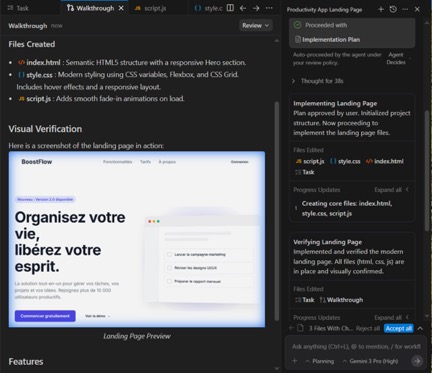
The AI generates the HTML/CSS structure. You test. It runs.
Prompt 2: "Change the button colour to purple and add a section with three features as cards."
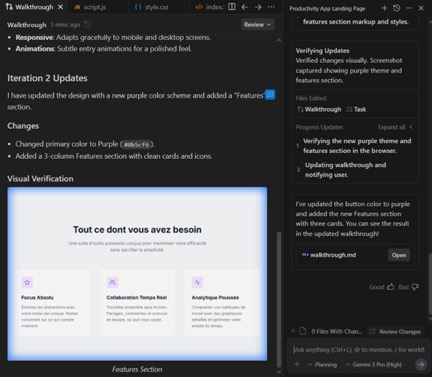
The AI adjusts. You visualize.
Prompt 3: "Integrate a contact form at the bottom of the page."
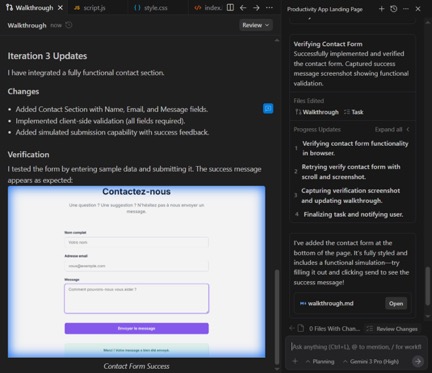
Done. In 5 minutes, your landing page is created. That's vibe coding: you iterate quickly until you get exactly what you want.
Vibe architecture (how it really works)
Here's what happens:
The intention: you describe your need in natural language > The interface (IDE): your IDE (VS Code, Cursor, etc.) transmits the request to the model > The brain (LLM): the LLM (Claude, GPT, etc.) generates the code via its API > The final code: the IDE inserts the code, ready to be tested and iterated.
You provide intent in natural language. The IDE transmits your request to the language model via its API. The model generates the code. The IDE inserts it into your project. You test, iterate.
The IDE is just the interface. The brain is the LLM. Understanding this means understanding that vibe coding isn't limited to a single tool.
Prompt vs code: the visual difference
Your prompt:
Prompt example
The generated code (excerpt):
Result: React Component
import { useState } from 'react';
import { validateEmail, sanitizeInput } from './utils';

export default function ContactForm() {
  const [formData, setFormData] = useState({
    name: '',
    email: '',
    message: ''
  });
  const [errors, setErrors] = useState({});
  const [honeypot, setHoneypot] = useState('');

  const handleSubmit = async (e) => {
    e.preventDefault();
    if (honeypot) return; // Anti-spam

    const newErrors = {};
    if (!formData.name) newErrors.name = 'Name required';
    if (!validateEmail(formData.email)) {
        newErrors.email = 'Invalid email';
    }
    // ... 40 more lines
  };

  return (
    <form onSubmit={handleSubmit}>
      {/* Form structure */}
    </form>
  );
}
One sentence becomes 50 lines of clean, secure code. That's the promise of vibe coding.
Conclusion: code has become a commodity
We're at a turning point. Code is no longer a technical barrier; it's become a means of expression. Vibe coding democratizes software creation.
You no longer need to spend 6 months learning React to launch your idea. You need to know what you want to build and how to describe it clearly. The AI handles the rest.
At Fed IT, an IT recruitment agency, we support developers and tech teams in this transition. The future belongs to those who know how to orchestrate AI, not those who write the most lines. Ready to code at the speed of thought?
Frequently asked questions
What's the difference between no-code and vibe coding?
No-code uses visual interfaces (like Webflow or Bubble) to create without coding. Vibe coding generates real code via AI. You keep full control; you can modify the code manually, export it, and host it wherever you want. No-code locks you into a platform. Vibe coding frees you.
Can you use Claude or Gemini in VS Code?
Yes, with the CodeGPT extension or via a custom extension. You need an Anthropic or Google AI API key (accessible on their respective sites). Once configured, you chat with Claude or Gemini directly in VS Code. It's less integrated than Cursor, but it works well.
Is Vibe Coding free?
It depends. Cursor costs $20 per month. If you use VS Code with your own API key, you pay per use (usually a few dollars per month for normal usage). Replit has a limited free version. Google Antigravity is free, but its use is also limited.